


Pokémon GO was developed as a mobile game, but every year people look for ways to play the game on PC. And also using a joystick if at all is possible? But whether you’re sick of walking for miles, looking for smoother and more accurate control or simply want to play on a larger screen, the lure of using a PC to play Pokémon GO is becoming harder to resist.
While Niantic doesn’t officially support playing Pokémon GO on a computer, there are a few other ways you can get the game to work on your computer, although they’re also generally more risky since we’ve seen a new ban wave moving about recently that most likely encompasses these methods. In this guide, we will demystify what it is you can and can’t do, what to steer clear of as well as how players really play Pokémon GO on PC with a wickedly effective Pokémon GO spoofer in 2026.
Can You Play Pokémon GO on PC?
The short answer is no. You really can’t play Pokémon GO as such directly on a computer. You can use a computer to change your phone’s GPS location, though, which will give you something close to playing the game on a PC. This type of approach doesn’t modify the game in any way; it just fools Pokémon GO into thinking it is somewhere else. That’s why most current methods rely on the GPS location changers instead of old-style emulators.
Why Emulators Are No Longer Recommended
In the past, people used Android emulator tools for Pokémon GO on PC. Nowadays, this is not recommended. Niantic can now easily notice emulator usage. This affects many players who encounter problems such as:
- Frequent soft bans
- Pokémon running away immediately
- PokéStops are not functioning
- Restrictions on temporary and permanent accounts
If you’re in search of the way to play Pokémon GO hacked games on PC, be sure to know that hacked applications and emulators have the highest possible risk. Therefore, most experienced gamers have turned to the usage of PC-based GPS management software.
How Playing Pokémon GO on PC with a Joystick Actually Works
Fortunately, a safe and feasible configuration is as follows:
- The program runs on your actual phone, whether it’s an iPhone or an Android.
- Your phone is connected to a PC
- A location changer takes control of the GPS from the computer
- The joystick allows you to move in the game in a natural way
As far as you are concerned, you’re playing Pokémon GO on your computer, even though the actual gameplay is taking place on your cellular device. The advantage of using this technique is that you’re using neither an emulator nor jailbreaking your device and that your original Pokémon GO app stays intact.
Why a Joystick Matters
If all that the game involves is teleporting between places, the game play can seem unnatural and risk-prone. A joystick will enable a player to:
- Don’t teleport between locations; instead, move in a continuous motion
- Hatch eggs the natural way as you walk
- Spin PokéStops without facing cool-down issues
- Make adjustments to direction and walking rate precisely
For gamers who are interested in playing Pokémon GO games using computer controls, a joystick is a must.
Using MagFone Location Changer to Play Pokémon GO on PC
One of the most useful tools for this configuration, is MagFone Location Changer. It’s intended to allow users to alter and simulate GPS movement via a computer, all while maintaining stable gameplay.
It doesn’t put you through a flurry of fussy settings, but simple, realistic movement - exactly the kind that Pokémon GO is calling for.
Why This Approach Works Well
MagFone Location Changer won’t do anything to Pokémon GO itself. It will, however, supply your phone with controlled GPS information. Which means that:
- The Pokémon GO official app remains unmodified
- Upgrades won’t affect functionality
- You’re less likely to have abnormal movement detection triggered
For those players wishing to use their PC and joystick to play Pokémon GO, this is one of their main benefits.
How to Play Pokémon GO on PC with a Joystick (Step-by-Step)
Here’s a realistic view of how players will utilize this system.
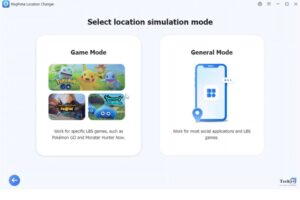
Step 1: Open MagFone Location Changer on your computer. Connect your iPhone or Android device via USB. The Start button is then clicked.
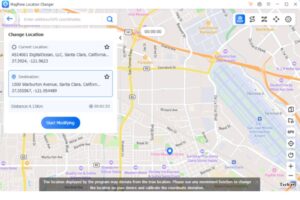
 Step 2: Once you are inside the map, you have the option to search using city, address, or GPS coordinates. Once you click “Start Modifying,” your GPS location simulates being altered in your mobile phone. Cooldown is taken care of.
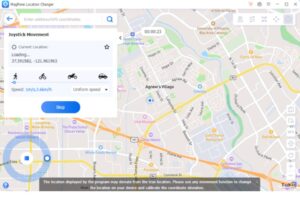
Step 3: Turn on joystick control for manual control of movement. With joystick control, you can walk, turn, stop, and control walking speed as in actual walking.
 Step 4: Run Pokémon GO, and immediately the game will respond to the movement of the joystick. And from this step onward, you are playing Pokémon GO on PC as if you are playing it on smartphone with natural movement.
Is This Method Safe?
Spoofing techniques are never completely foolproof, but some spoofing techniques are much safer than others. This PC-controlled GPS spoofing method is considered to be much better than other spoofing methods since it does not include any kind of emulators, does not include “modded” Pokémon GO apps, and also includes support for “cooldowns” and enables “real.
Such software as MagFone additionally has the function for route simulation, which assist in simulating real actions performed by actual players, not teleporte positions.
Tips to Reduce Risk When Playing Pokémon GO on PC
To use spoofing ethically, you should consider the following guidelines:
- Respect cooldowns between locations
- Refrain from sudden range extensions
- Instead of teleportation, walk at normal speeds.
- Refrain from interaction during the cooldown time
- Keep routes realistic
A joystick is very helpful in this situation because it inspires natural behavior.


